- Home
-
- Blog
-
- TE Edit Control: Power-Packed Text Editing for Developers
-
TE Edit Control: Power-Packed Text Editing for Developers
To build applications, developers require handy tools to simplify the process. The challenge of incorporating text editing functionality into applications is made easy by TE Edit Control. This multifunctional tool enables applications to be enriched with text editing features without the need to do heavy coding work. It is suitable for document and application creation because of its capability to handle various formats, fonts, tables, and images. It is cross-platform for Windows, web, and Java, which greatly reduces work and time.
These benefits make TE Edit Control ideal for building applications.
Simple to Implement
The TE Edit Control tool is something developers can add to their programs without much difficulty. It is packaged as a DLL file, and thus can be used with C++, C#, Visual Basic, Java, and other languages. It can be incorporated into desktop, web, and even mobile applications. The tool is completely free of royalties, which allows for easy distribution of the application. Additionally, it includes the Windows and .NET versions as source code which allows developers to modify it. This enables easy customisation for numerous projects, and minimal work for developers who want to add text editing features.
Enabling Rich Text Formatting
TE Edit Control allows you to incorporate multiple text styles into your application. Both subscript and superscript are supported by this editor. Developers can also implement unique features such as text boxes and collapsible text. The tool can handle Arabic and Hebrew and works with Chinese and other Asian languages. This is beneficial for worldwide applications, enabling users to design professionally formatted documents.
Tables and Lists
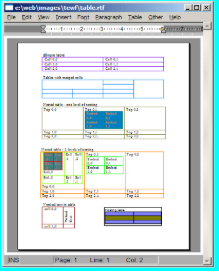
With TE Edit Control, adding lists and tables is straightforward. You can insert basic and intricate tables, such as nested tables where one table is contained within another. The editor is similar to Microsoft Word, where tables can be bordered, shaded, and merged. Developers usually go for cell spacing so that the documents look neat and the text is not cramped. The tool also supports multi-level auxiliary and counted lists. You can customise bullet symbols, fonts, and colours to match your application. These features allow users to create structured documents.
Images and Shapes
Users can enhance documents by adding images with the TE Edit Control. You can import bitmap images from a file or clipboard and position them anywhere within the text. The tool supports various layouts for images, such as floating or inline. Developers can also create movable shapes and text boxes, which users can reposition. Having images or shapes within a piece of text makes it visually appealing. This is important when writing letters or reports which require a sophisticated blend of text with images and other graphics.
Mail-Merge and Hyperlinks
For letters and reports creation, TE Edit Control has a mail-merge functionality. It allows merging with other applications, so one can place fields that will be populated with information such as name or address. You will find it particularly helpful for sending bulk emails or personalised printed forms. The editor also allows hyperlinks, which provide the ability to jump to other portions of the text or external pages. Towards this goal, this functionality is useful to simplify building business applications that require primary document automation or other mapped document processes with interactive features.
Printing and Preview
TE Edit Control simplifies document printing and adds to automation features by including print preview. Adding silos within applications is important. Users can print directly or through an external editor by opening the document within the application, TE Edit Control allows. Within the print options the editor has, the tool allows the insertion of page numbering, which aids in keeping a professional look and feel of the document. Unlike other external tools, it is responsive with big documents in the background and will not slow down, which is important in big print tasks such as reports, manuals, etc.
Operates on Multiple Systems
This software is quite universal as it operates in several environments. The Windows version supports both Win32 and Win64 architectures as well as ActiveX for Visual Basic and Delphi. The .NET version is built with C# and integrates with web applications using ASP.NET. The Java version is compatible with Java 6 and later, which is great for portable applications. There is also a version in HTML/JavaScript for web browsers, which allows for easy integration of text editing into web applications. Such extensive compatibility allows the TE Edit Control to be used in nearly any project.
Why it’s Great for Developers?
TE Edit Control helps developers with off-the-shelf functionality. There is no need to write a text editor as a complete multifunctional tool, as images and formatting are provided. The developer’s kit gives control of the editor’s components through APIs, which cover editing text styles and setting tables. The installation is straightforward: extract the zip file and follow the provided directions. Moreover, the tool’s prompt technical support aids in resolving problems rapidly. Developers can maximise text editing functionalities in their applications instead of spending time worrying about text editing programming.
Additional Capabilities
TE Edit Control comes with extensions that increase its functionality further. With the HTML extension, users can edit HTML files within the editor. The spell checker extension also helps to identify misspelt words. There is even a utility for converting rich text to PDF, which is handy for document sharing. These applications extend the versatility of the tool for a wide range of applications, from web forms to business applications.
Build Better Apps
TE Edit Control for developers, improve apps and make them more user-friendly. The app editing tool is user-friendly, time-efficient, works with multiple formats, and saves time. With multiple features, developers can build apps for global use.
For precise text editing solutions, rely on Sub Systems, an industry leader with text editing tools for developers.

